
AI and OpenClaw
Connect OpenIMServer through OpenClaw Gateway and verify the first message.
Integrate OpenClaw
This guide explains how to connect OpenIMServer to OpenClaw Gateway and verify the integration by sending and receiving a test message.
Prerequisites
- OpenIMServer and ChatServer deployed.
- OpenClaw Gateway deployed and running.
- Access to the
openclawCLI command on the gateway host.
Register an OpenClaw bot user
Register the user account
Log in to the Admin Console (default address: http://server_ip:11002, where server_ip is the IP address of your OpenIMServer host).
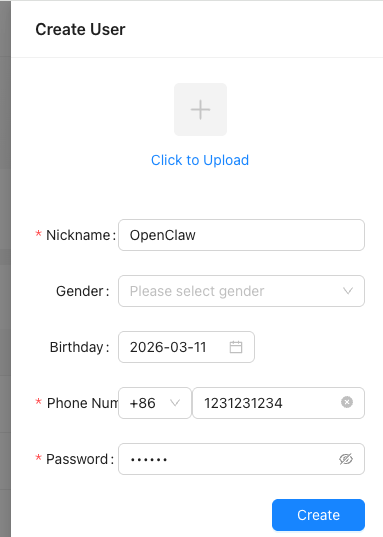
Navigate to User Management > User List and click Create New User:

Enter the account credentials and profile details:
Retrieve an admin token
Call the Get admin token endpoint to obtain administrative credentials.
Issue a user token
With the admin token, call the Get user token endpoint to generate a login token for the newly registered user. Set userID to the registered account ID and set platformID to 12 (representing the Bot platform).
Install the OpenIMSDK Channel plugin
Install the OpenClaw channel plugin from npm:
openclaw plugins install @openim/openclaw-channelPlugin package: <https://www.npmjs.com/package/@openim/openclaw-channel>
Enable and configure the OpenIMSDK Channel
Option 1: Interactive wizard (recommended)
Run the interactive setup tool:
openclaw openim setupFollow the prompts to enter token, wsAddr, and apiAddr.
Option 2: Edit configuration directly
Open ~/.openclaw/openclaw.json and configure the channel:
{
  "channels": {
    "openim": {
      "accounts": {
        "default": {
          "enabled": true,
          "token": "your_token",
          "wsAddr": "ws://127.0.0.1:10001",
          "apiAddr": "http://127.0.0.1:10002"
        }
      }
    }
  }
}
Verify: Send the first message
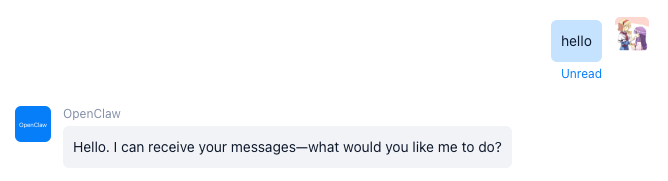
In an application integrating OpenIMClientSDK, search for the bot account using its userID, then send a message to confirm it replies automatically.
If the client successfully receives an automatic reply, the OpenClaw bot integration is functioning properly.
Troubleshooting
OpenIM is not connectederror: This error is returned by the channel plugin whentoken,wsAddr, orapiAddrare misconfigured or when the network endpoint is unreachable. Verify your connection parameters and review OpenClaw Gateway logs for connection details.